What Tinylawn's AI Receptionist Sounds Like When a Homeowner Calls About a Hazardous Tree
A step-by-step walkthrough of how Tinylawn's AI receptionist handles a call from a homeowner worried about a dangerous tree — from greeting to property report.
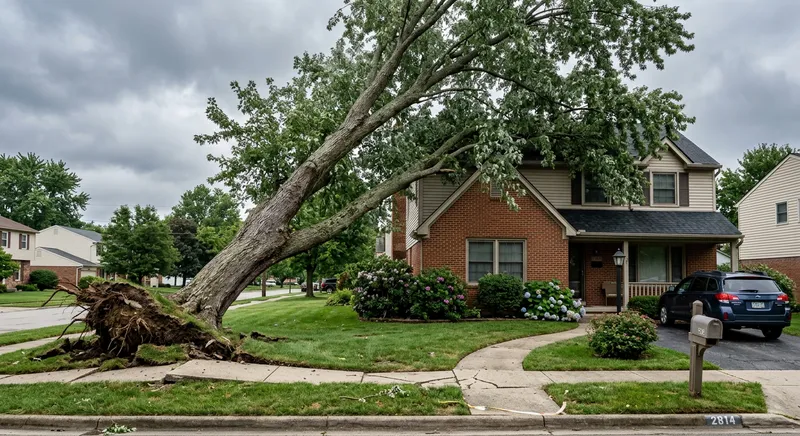
Table of Contents
It’s a Wednesday afternoon in late September. You’re rigging a 28-inch ash removal in a tight backyard — the kind of job where every cut matters and the drop zone is a 10-foot strip between the house and the fence. Your phone is in your truck, 80 feet away.
Meanwhile, a homeowner three miles away — let’s call him David — is standing in his front yard looking at a large silver maple. The tree has been leaning gradually for a couple of years, but after last week’s heavy rain, the lean is noticeably worse. He can see soil lifting on the uphill side of the root plate. His daughter’s bedroom is directly in the fall line.
David pulls up Google, searches “tree service near me,” and starts calling. Your company is the second result.
The call
David dials your number. You’ve set up call forwarding from your business line to Tinylawn, so when you can’t answer after a few rings, the call routes to the AI receptionist.
The AI picks up within one ring.
What David hears:
“Hi, thanks for calling [Your Company Name]. This is Sarah. How can I help you today?”
The voice is conversational — not a phone tree, not a recording, not “press 1 for tree removal.” David starts talking immediately, the way he would with any receptionist.
David explains the situation
David describes what he’s seeing: a large silver maple in his front yard, maybe 50 feet tall, leaning toward the house. The lean has gotten worse since the rain. He thinks he can see roots lifting on one side. He wants someone to come look at it.
The AI doesn’t just say “let me take a message.” It engages with what David is describing, and based on the FAQs you’ve configured in your dashboard, it can respond to common questions:
- “Do you handle large tree removals?” — Yes, if you’ve added that to your FAQ responses.
- “What’s your service area?” — The AI gives the answer you’ve configured.
- “Can someone come out this week?” — The AI can either offer scheduling (if you’ve set up availability) or let David know someone will call back to discuss timing.
The AI recognizes this as a quote request — David is describing a specific tree issue and wants someone to come assess it. It shifts into information-gathering mode.
Information capture
The AI collects the details you need to evaluate the inquiry and prepare for a callback:
- Name: David Chen
- Phone number: Confirmed from caller ID
- Property address: 2340 Birchwood Lane
- What he’s seeing: Large silver maple, approximately 50 feet, noticeable lean toward the house, worsening after recent rain, visible root lift on one side, house in the fall line
- Urgency: Wants assessment as soon as possible — not a true emergency (the tree hasn’t failed), but he’s concerned about the trajectory
- How he’d like to proceed: Wants someone to come look at it and give him options
This takes about 3 minutes of natural conversation. David isn’t filling out a form or answering a scripted survey — he’s talking to what feels like a receptionist who’s organized and asks the right follow-up questions.
Address validation and photo request
After the call, two things happen automatically:
Address validation. Tinylawn checks whether “2340 Birchwood Lane” is a valid address. If David said “Birchwood” but the actual street name is “Birchwood Lane Court,” the system catches the discrepancy and sends David a text to confirm or correct the address. This prevents wasted drive time to the wrong location — a real issue for tree care companies covering wide service areas.
Photo upload link. The AI sends David an SMS with a link to upload photos of the tree. For this situation, photos are gold. David can take a picture of the lean, the root plate, the proximity to the house, and any visible damage. These attach directly to his lead record in your dashboard.
David snaps four photos while he’s still in the front yard: one showing the lean angle, one of the lifted roots, one from the street showing the tree relative to the house, and a close-up of a crack in the trunk he hadn’t mentioned on the phone.
That fourth photo — the trunk crack — might change your triage from “schedule an assessment this week” to “this needs a same-day look.” You wouldn’t have known about it from the phone call alone.
What you see when you check your phone
You finish the ash removal at 4:15 PM, load the truck, and check your phone. You have a notification from Tinylawn:
New lead — Quote Request
- David Chen, 2340 Birchwood Lane
- Large silver maple, ~50 ft, worsening lean toward house, root lift visible
- Wants assessment ASAP
You open the dashboard and see the full lead record:
- Contact info: David Chen, phone, address confirmed
- Call recording: Full audio — you can hear exactly how David described the situation, including details that might not make it into a written summary
- Transcript: Searchable text of the entire conversation
- AI summary: “Homeowner reports a large silver maple approximately 50 feet tall with an increasing lean toward the house. Lean has worsened after recent heavy rain. Visible root plate lifting on the uphill side. House is in the fall line. Caller is concerned about safety and requests an on-site assessment as soon as possible.”
- Photos: Four images David uploaded — the lean, the roots, the proximity to the house, and the trunk crack
- Call classification: Quote Request
The property intelligence report
Within minutes of the lead being created, Tinylawn also generates a virtual site visit report for David’s property:
- Property details: 0.31-acre lot, 2,400 sq ft house, single-family residential, built 1987
- Satellite imagery: An overhead view of the property showing the tree canopy, the house footprint, driveway, and neighboring structures
- Parcel boundaries: The exact property lines, so you know what’s on David’s property versus the neighbor’s
- AI site inspection report: A written analysis noting the mature canopy visible in the aerial imagery, proximity of large trees to the structure, and access considerations (driveway width, fencing, neighboring properties)
For tree care specifically, the satellite imagery is immediately useful. Before you drive to the property, you can see:
- Canopy spread relative to the house. How much of the tree is over the structure?
- Access for equipment. Can a crane reach from the street? Is the driveway wide enough for a truck and chipper? Are there overhead wires?
- Neighboring trees and structures. Will the removal affect adjacent properties? Are there other trees that complicate rigging?
- Lot size and terrain. Is there room for a drop zone, or is this a full-rigging, piece-by-piece removal?
This doesn’t replace an on-site assessment — you still need to see the tree in person to evaluate the lean, the root condition, the wood quality, and the structural integrity. But it means you arrive at David’s property already understanding the layout, the access constraints, and the general scope. Your on-site visit is more efficient and your estimate more accurate.
Your callback
At 4:30 PM — 2 hours after David’s call — you call him back. But this isn’t a cold callback. You’ve reviewed the photos, the property report, and the call summary. The conversation opens differently than it would from a voicemail:
“Hi David, this is Mike from Canopy Tree Care. I’m calling about the silver maple at your Birchwood Lane property. I saw the photos you sent — I noticed there’s a crack in the trunk in addition to the lean and root lift you mentioned. Based on what I’m seeing, I’d like to come take a look at this in the morning rather than later in the week. Would 8 AM tomorrow work?”
David is impressed. You called back the same day, you already know the details, you saw the photos, and you’re prioritizing based on what you observed. He doesn’t have to re-explain anything. He confirms 8 AM and feels confident he’s dealing with a professional operation.
Compare this to the callback from a voicemail: “Hi, uh, this is Mike from Canopy Tree Care, returning your call. You called about a tree?” — followed by David re-explaining the entire situation, you asking for the address, and David wondering whether you actually care about his problem.
What the caller experiences
From David’s perspective, here’s what happened:
- He called a tree care company and a receptionist answered immediately — no voicemail, no phone tree, no hold music.
- The receptionist asked relevant questions and collected his information.
- He received a text to confirm his address and upload photos.
- He got a callback the same afternoon from someone who already understood his situation, had seen his photos, and had a specific plan.
He doesn’t know the receptionist was AI. He doesn’t particularly care. What he cares about is that the experience was responsive, organized, and professional — which is exactly what a homeowner with a hazardous tree wants from the company they’re about to trust with a $4,000–$8,000 removal next to their daughter’s bedroom.
The practical details
Setup: If you’re a tree care company considering Tinylawn, setup takes about 15 minutes. You pick a local phone number, set your company name and greeting, add your services (removals, pruning, stump grinding, consultations, emergency work), enter pricing ranges and FAQ answers, and forward your business line. The system pre-loads tree care-specific defaults when you select your industry during signup.
Pricing: $49/month for 25 calls (Pro), $129/month for 75 calls (Growth), $249/month for 150 calls (Scale). Core receptionist features—including call answering, scheduling, lead management, property reports, notifications, and forms—come with every plan. Growth and Scale add live transfers, team collaboration, Knowledge uploads, and higher operating limits. Spam calls are filtered automatically and don’t count toward your usage.
Free trial available — no credit card required. Forward your line, configure your services, and see how the AI handles real calls to your business. If you want to hear what it sounds like before involving real callers, call the number yourself and run through a scenario — describe a hazardous tree and see how the conversation plays out.
You can start the free trial here.